CRUSADE
FEATURES

Everything you need to make real parts.

Parts, sheet metal, weldments, assemblies, drawings, strength checks and renders, in one program you install and keep.

SKETCHING

Sketches that stay put.

Draw, dimension and relate. A sketch shows when it's fully defined, and a dimension that can't be met turns red and says why.

  • Lines, rectangles, circles, arcs, slots, polygons, splines and text
  • Automatic relations while you draw; snap, relate and dimension to the model's own edges
  • Dimensions that accept math and variables; Tab previews a value
  • Fully Define Sketch, box select, trim, extend, offset, mirror and patterns
A sketch with dimensions and relations
PART MODELING

A feature tree you can change your mind in.

Edit any feature and everything after it rebuilds. Drag the rollback bar to work earlier in the history.

  • Extrude and revolve (pick which sketch regions), sweep, loft
  • Fillet (also variable size), chamfer, shell, draft, rib
  • Hole Wizard: clearance holes by screw size and fit, tapped holes with cosmetic threads
  • Modeled threads, patterns, mirror, multi-body parts, wrap, dome, helix
  • Direct editing of imported STEP parts: move faces, holes and bosses
The part window with a modeled part and its feature tree
SHEET METAL

Bend it, then flatten it.

Model in the bent state; the flat pattern and its DXF come straight out of it.

  • Base and edge flanges, hems, jogs, sketched bends
  • Flat pattern and DXF export
A sheet metal part with a hem and an edge flange
WELDMENTS

Frames with a cut list.

Lay structural members along sketch lines. Corners are mitered for you, and the cut list groups equal pieces.

  • Structural members along sketch lines, mitered at the corners
  • A cut list you can copy straight to the saw
A weldment frame with its cut list
ASSEMBLIES

Put it together. Make it move.

Mate parts the way you think about them, and check that everything fits before anything gets cut.

  • Mates, including Fastened
  • A fastener library: ISO and ANSI screws, washers and nuts
  • Interference and clearance checks; collision detection while you drag
  • Exploded views; motion studies saved as animated GIFs
An assembly with socket-head screws and a hex bolt
DRAWINGS

Drawings the shop can actually use.

Views stay linked to the model, so a changed part means an updated drawing.

  • Standard, section, detail, auxiliary and broken views
  • Dimensions, GD&T, hole tables and weld symbols
  • Title blocks with your logo; templates
  • PDF and DXF
A drawing sheet with GD&T frames and a hole table
SIMPLESIM

Know it holds before you weld it.

Live strength checks while you model. They are quick estimates: double check them and test the real part.

  • Beams, shafts, plates and frames
  • Stress, deflection, buckling and fatigue life
  • Natural frequencies and bolted joints
  • Results update as you change the model
SimpleSim results on a welded frame
RENDERING

Show the customer the finish.

Path-traced pictures in the app, saved at the size and quality you choose.

  • Real materials and finishes: anodized, black oxide, powder coat, brass, chrome
  • Backgrounds, camera and depth of field
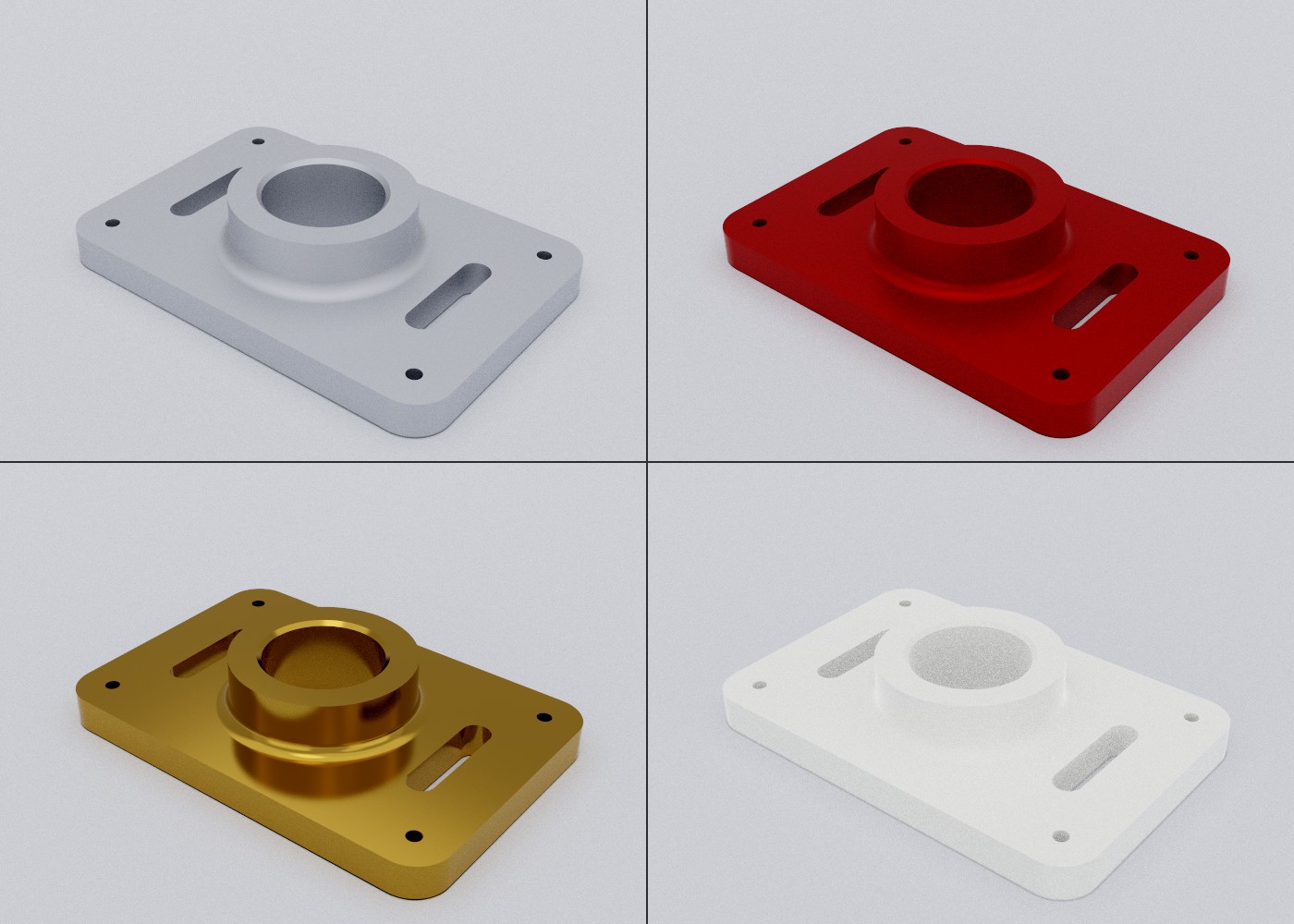
One part rendered in four finishes
EVERYDAY TOOLS

The small things, done properly.

The tools you reach for every day, plus a few you'll be glad are there.

  • Measure: distances, angles and sizes with X / Y / Z
  • Variables, design tables and configurations
  • Cost estimate; design checks for CNC and 3D printing; print orientation
  • STEP, IGES, STL and 3MF; Pack and Go
  • Version history, auto save, and updates announced in the app
The Measure panel
TRY THE LOOK

Aqua, Dark or Light.

The same three looks Crusade offers when it first starts. Click the tabs and the feature tree.

FileEditViewInsertTools ● Up to date
ExtrudeRevolveFilletShellHolePattern
FEATURES · 5
Boss-Extrude1 selected
Boss-Extrude1 · 1.000 in thickIPS [in]
SHARE WITH ANYONE

Send the file. They open it free.

Crusade is free to download and use as a viewer, so the people you send files to (customers, shops, coworkers) open your parts, assemblies and drawings without a license or an account. An assembly or a drawing you share opens on its own, without its parts. A license unlocks editing.

  • Turn, section and explode; configurations, the feature tree and the BOM
  • Measure, mass properties, renders and pictures
  • Drawings to print or PDF; STEP, STL and 3MF out, unless you turn exporting off for a file
  • Also opens STEP, IGES, STL, 3MF and DXF
Download Crusade, free to view →
Crusade without a license showing a motor mount assembly, exploded, with its components
ALL FEATURES

Looking for something?

Every feature, by file type and the tab or menu it lives on in Crusade. Search finds names and details, so “keyway” or “kerf” works too.

193 features

Parts

113 features
Features tab · Boss / cut
  • Extruded Boss/BaseBlind, Through All, Mid Plane, Up To Next / Surface / Vertex / Body; Direction 2; draft; thin feature; pick sketch regions; Instant3D drag
  • Revolved Boss/BaseAround a centerline; thin feature; drag handle for the angle
  • Swept Boss/BaseA profile along a path sketch or a helix (springs, coils)
  • Lofted Boss/BaseBetween profile sketches on different planes
  • Extruded CutSame end conditions as Extrude; starts in the direction that removes material
  • Revolved Cut
  • Swept Cut
  • Lofted Cut
Features tab · Modify
  • FilletConstant or variable size; drag handle; tells you which edge failed
  • ChamferEqual distance, distance-distance, distance-angle
  • ShellHollow the part, picked faces left open
  • Delete FaceRemove holes, fillets or logos and heal; works on imported STEP
  • Offset FaceMove faces along their normals
  • Move FaceMove or turn a hole, pocket or boss
  • DraftTaper faces from a neutral plane for molded and cast parts
  • RibA gusset from a sketch line, grown until it meets the part
  • Structural MemberWeldments: square / round tube, bar, angle, channel along sketch lines, mitered corners
  • CombineAdd, subtract or intersect bodies
  • SplitBy plane, face or sketch lines
  • Move/Copy Body
  • Delete/Keep Body
  • Insert PartBring in another part that follows its file; mirror, move, join or cut a mold cavity
  • Save BodiesEach body into its own part
  • ScaleUniform or per axis, about origin or centroid (print shrinkage)
  • Hole WizardHole, counterbore, countersink, tapped; UNC / UNF #0-80 to 1 1/2", ISO M1.6 to M48 with fine pitches
  • ThreadModeled ISO metric / Unified inch thread, or a cosmetic thread
  • GearInvolute spur, helical, internal, rack, face; profile shift, backlash; bore with keyway, D-flat or hex, and hub
Features tab · Patterns & reference
  • Linear PatternWith Direction 2
  • Sketch Driven Pattern
  • Fill PatternFill a region, or ready-made vent holes
  • Curve Driven PatternAlong a sketch curve or helix
  • Circular Pattern
  • MirrorFeatures, or the whole part
  • PlaneOffset, at an angle, mid plane
  • HelixPitch, turns, taper, left hand
  • Split LineSplit faces with a projected sketch
  • WrapEmboss, deboss or scribe a sketch or text around a cylinder
  • DomeSwell or dish a flat face
Sketch tab · Draw
  • SketchOn a plane or a flat face; Exit Sketch with Ctrl+Enter
  • Smart DimensionD; lengths, distances, radius, diameter, angle, diameter for revolves
  • Fully Define SketchAdds the missing relations and dimensions
  • LineL
  • Corner RectangleR; also Center and 3 Point (any angle)
  • CircleC; also Perimeter Circle (3 points)
  • Ellipse
  • 3 Point ArcAlso Centerpoint Arc and Tangent Arc (T)
  • Spline
  • Sketch PictureTrace over a photo; scale and picture properties
  • Import DXFAlso Export Sketch as DXF
  • TextFont, height, angle, bold; extrude or cut to emboss or engrave
  • Straight Slot
  • Polygon
  • Gear ProfileGear, ring gear or rack outline with a kerf offset for laser, waterjet or router
  • PointP
  • Centerline
Sketch tab · Modify & relations
  • Trim EntitiesPower Trim: click or drag across
  • Extend Entities
  • Split Entities
  • Sketch Fillet
  • Sketch Chamfer
  • Offset Entities
  • Mirror Entities
  • Convert EntitiesBring in model edges, silhouettes or earlier sketch geometry, linked
  • Linear Sketch Pattern
  • Circular Sketch Pattern
  • Move/Copy, Rotate, Scale Entities
  • ConstructionQ: next entity only, or toggle the selected ones
  • RelationsCoincident, horizontal, vertical, parallel, perpendicular, tangent, equal, concentric, midpoint, collinear, symmetric, fix, offset
  • Box selectWindow to the right, crossing to the left; copy and paste
  • Inference lines and snapping
  • Existing Relations listDelete one relation from the sketch panel
Sheet Metal tab
  • Base Flange/TabClosed sketch = flat tab, open lines = a bent part
  • Edge FlangeLength, angle, flip
  • HemClosed or with a gap
  • Sketched BendBend along lines drawn on a flat face
  • JogA Z step at a sketched line
  • Flat PatternShow it unfolded
  • Export Flat Pattern (DXF)Outline with bend lines for laser, plasma or waterjet
Evaluate tab
  • MeasureCenter, min and max distance with X / Y / Z legs, angle, length, area; make a variable from a value
  • Mass PropertiesMass, volume, area, center of mass, moments of inertia
  • Cut ListWeldment members by stock, length and end angles, with quantities
  • SimpleSimLive strength check: beams, shafts, plates, frames; loads, fatigue, temperature; stress, deflection, factor of safety
  • Bolt CalculatorPreload, tightening torque, factors of safety for a bolt pattern
  • Print OrientationRanks which way up prints with least overhang; export 3MF that way
  • AnalysisColor by draft angle, wall thickness, curvature or zebra stripes
  • Design CheckWhat's hard to make by CNC or 3D printing
  • Cost EstimateRough price by CNC, 3D printing, sheet metal or weldment, from your shop rates
  • VariablesEquations and linked tables (Excel, LibreOffice, .kvar)
  • ConfigurationsVariants of the part in one file (design table)
  • Make Drawing from Part
View tab
  • Standard viewsFront, Top, Right, Isometric, Normal To (Ctrl+8)
  • Zoom to FitF; also Zoom to Selection
  • Section View
  • Display styleShaded With Edges, Shaded, Wireframe
  • Show Planes / Show Sketches
  • RenderPath traced: shadows, reflections, real materials and finishes
  • Save Render ImageWindow size, 2×, 4K; Draft / Good / Best
  • Render OptionsStudio, Outdoor, White, Dark; perspective; depth of field
  • Selection FilterFaces, edges, vertices
Menus & part window
  • ShareOne self-contained file or a Pack and Go zip
  • Pack and Go
  • Where Used
  • Version HistorySave Version, Release Revision
  • Import / ExportSTEP, IGES in; STEP, IGES, STL, 3MF out
  • Gear Pair (Insert menu)A new assembly with a meshing pair
  • Macro ConsolePython; Run Macro
  • Keyboard ShortcutsCustomizable
  • Feature treeValues after names, hover to see faces, rename, suppress, roll back, drag to reorder, rollback bar
  • Edit MaterialMaterial, finish, finish color; appearance for the part or single faces
  • Bodies listHide, show, isolate
  • Context toolbarOn a face, edge or plane: edit, sketch, fillet, chamfer, measure, appearance
  • Rebuild lightGreen / yellow / red with the error list
  • Quick measureIn the status bar when two or more things are selected

Assemblies

37 features
Assembly tab
  • Insert ComponentsCtrl+I; parts, STEP files, subassemblies
  • Insert FastenerSocket head, hex bolts, nuts, washers, ISO or ANSI; click a hole rim and it's sized and mated
  • Gear PairFrom ratio and center distance; ranked suggestions, live mesh preview, Lewis / Hertz check
  • Standard matesCoincident, parallel, perpendicular, tangent, concentric, lock, fastened, distance, angle
  • Advanced matesProfile center, width, symmetric, path, linear coupler
  • Mechanical matesHinge, slot, cam, gear, rack and pinion, screw, universal joint
  • Move ComponentDrag to move, right-drag to turn; mates stay satisfied
  • Collision DetectionOn or off while dragging
  • Fix / Float
  • Component PatternIn a row or around an axis
  • Mirror Components
  • Exploded View
  • Motion StudyRotary motor, drive a mate, explode and collapse; play, scrub
  • Save GIFMotion studies straight to an animated GIF
  • VariablesAnd linked tables
Evaluate tab
  • Interference Detection
  • Clearance CheckSmallest gaps, drawn as lines
  • MeasureSame panel as parts
  • Section View
  • Bill of MaterialsWith each part's finish
  • Mass PropertiesWarns about parts with no material
  • Bolt Calculator
View tab
  • Standard viewsFront, Top, Right, Isometric; zoom
  • Display styleShaded With Edges, Shaded, Wireframe
  • Reference PlanesMate to the assembly's own planes
  • RenderSave Render Image, Render Options
  • Selection FilterFaces, edges, vertices
Menus & assembly window
  • Share / Pack and Go
  • Where Used
  • Version HistorySave Version, Release Revision
  • ExportSTEP, STL, 3MF
  • Quick matesClick a face, Ctrl+click another, the toolbar offers mates that fit
  • Replace Part
  • Change Transparency
  • Hide / IsolateTab hides the part under the cursor, Shift+Tab shows the last one
  • Edit mates in the treeDouble-click to edit; suppress, delete
  • Macro Console

Drawings

32 features
View Layout tab
  • Standard 3 ViewFront, top, right, plus isometric
  • Model ViewOne view; sheet metal also offers its flat pattern with bend lines
  • Projected ViewThird angle
  • Auxiliary ViewSquare to a picked edge: an angled face at true size
  • Section View
  • Detail View
  • BreakShorten a long part; dimensions keep their true length
Annotation tab
  • Smart DimensionD; hole callouts such as "1/4-20 TAP THRU"
  • Ordinate / Baseline / Chain Dimension
  • Auto DimensionOutline, steps, hole positions and sizes in one go
  • Note
  • Geometric ToleranceGD&T feature control frame with modifiers and up to three datums
  • Datum Feature
  • Surface FinishRa, machining required
  • Weld SymbolAWS A2.4: fillet, V, bevel, square groove, plug, spot; all around, field weld
  • Bill of MaterialsFor an assembly view
  • Auto Balloon
  • Revision Table
  • Hole Table
  • Cut ListWeldment
Sheet tab
  • Sheet PropertiesSize, scale, title block (Standard, Compact, ISO 7200), company logo
  • View PropertiesScale, hidden lines, center marks, thread callouts, label
  • Export PDF
  • Export DXF
  • Zoom to Sheet
  • Dark SheetOn screen only; prints and exports stay white
Menus & automatic
  • TemplatesSave as Template, Apply Template
  • PrintCtrl+P
  • Flip Section Direction / Remove Breaks
  • Center marks and centerlinesAdded on holes and round faces
  • Thread calloutsOne per size, e.g. "4× 1/4-20 UNC"
  • Trailing zerosInch drawings keep them (ASME), metric drop them

Every window

11 features
Everywhere
  • HomeCtrl+F2; new documents, recent files, What's New, Check for Updates
  • Search commandsAlt+C
  • Shortcut ToolbarS
  • View cubeFull, small, hidden or name bar; three looks
  • View pickerSpace
  • SpaceMouseLinux
  • Unit-aware steps1/8" or 1 mm
  • ThemesAqua, Dark, Light
  • Auto Save and recoveryCrash-recovery copy, backups, version history
  • Free viewer modeOpen, view, measure, render and print without a license
  • Linux and WindowsOpens STEP, IGES, STL, 3MF and DXF
Crusade app icon

Stop renting your tools.

Pay once. The same license covers every future version.